
Web designers use CSS sprites to reduce the number of requests made by a web page. Essentially a composite image, made up of many smaller images, is used as a common background for a slew of elements, and then the relevant image is ‘revealed’ using CSS.

My paltry little CSS sprite for the social icons on my portfolio site
Nothing amazing, it was popularized back in 2004 by Dave Shea on A List Apart.
However, you may have heard of this responsive web design malarkey, whereby CSS media queries, a flexible grid and scalable images all combine to serve one web site to many platforms. God bless beep for letting such a genius genie out of the bottle.
Problem is, CSS sprites don’t scale out of the box. You could use the new CSS3 Background-size property but it isn’t supported in Internet Explorer 8 and below.
Or, you could use a web font. This brings vector goodness (ie scalable, colourable, drop shadowable graphics) to users of old web browsers. Font Awesome is the most spectacular collection of icons collected in one font and made for the Twitter Bootstrap boilerplate.
The beauty is two-fold: firstly, if you serve up different font formats using @font-face web fonts, you cover browsers back to Internet Explorer 5.5! (See Font Squirrel’s font formats for more info). Secondly, you can apply the latest/greatest/most-fashionable CSS3 effects such as rounded corners, opacity and text shadows, and it will all scale.

This Immersive, Multi-Faceted Programming Education (80+ Hours) Will Push You to the Top of the Job Market

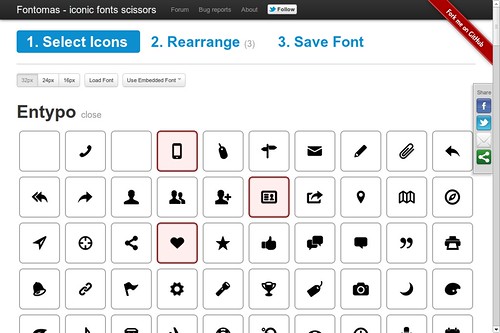
Screenshot of Fontomas website
Another immensely useful online font tool is Fontomas, which enables you to upload a font and cherry pick just the characters/symbols you want, and then generate a 'minified' custom font. This results in a minimal file size for super fast download.
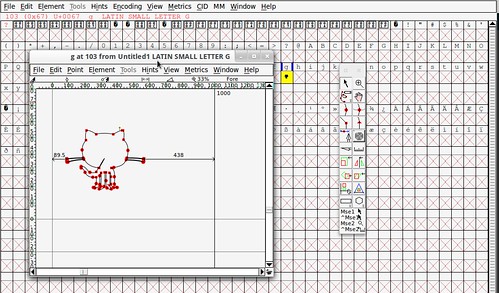
FontForge, cross-platform font outline editor. Back to the Future!
You can combine this with creating your own custom font. This is a lot easier than it sounds with the stalwart, cross-platform, open source font editor FontForge. Okay, it looks like software from the 20th century. But it does the job, and you can import SVG vector files fresh from Illustrator/Inkscape.h






























Join Discussion